






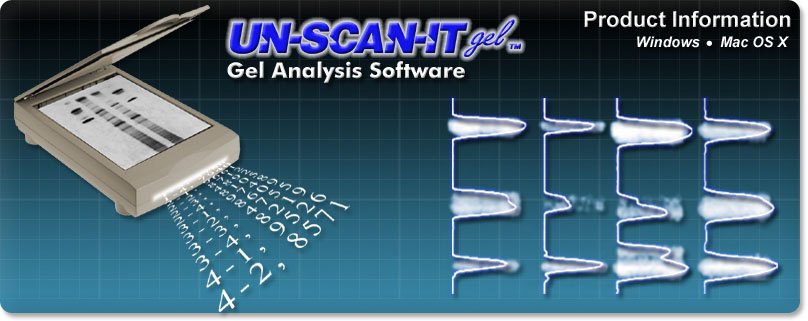

Gel Analyzer Software

37 Years Experience | Free Telephone & Email Support!
"Thanks for putting and keeping together a great quantitation/imaging program." - Jerome L., New Jersey, USA
"I have used several other programs for gel analysis over the last few years, and continue to return to UN-SCAN-IT gel as the most efficient and most flexible program available." - Susan B., Missouri, USA
"I've just started using UN-SCAN-IT gel, and just want to say it's a great program." - David H., Australia
What is UN‑SCAN‑IT gel ?
The UN-SCAN-IT gel Analysis Software uses your scanner gel images for gel densitometric analysis, and allows you to automatically analyze gel electrophoresis images. UN‑SCAN‑IT gel works with most image formats (JPG, TIFF, GIF, BMP, PNG, etc.) from any scanner, digital camera, or other image source to quantify electrophoresis gels. UN‑SCAN‑IT gel can analyze Northern blots, Ethidium Bromide gels, Agarose gels, Coomassie stains, dot blots, TLC, etc. In addition to the gel analysis features, UN‑SCAN‑IT gel also contains all the (x,y) graph digitizing features of regular UN‑SCAN‑IT.
Instead of guessing at the intensity or location of gel bands, holding gels up to a light to compare band locations and intensities, or waiting in line to use an expensive gel densitometry system... try UN‑SCAN‑IT gel. The UN‑SCAN‑IT gel software is an accurate and easy to use alternative to other gel electrophoresis software.
With UN-SCAN-IT gel you can...
- Turn your scanner into a gel densitometer
- Analyze JPG, TIFF, GIF, BMP, PNG and many other image formats
- Automatically analyze lanes, segments, and dot blots
- Quantify Northern blots, Ethidium Bromide gels, Agarose gels, Coomassie stains, SDS-PAGE, etc.
- Improve accuracy and reproducibility
- Reduce the need for guesswork in gel quantifying
- Automate your gel analysis for a much lower cost than other densitometry software
- Reduce gel analysis times and increase laboratory productivity
- Determine the relative abundance and position of each band or segment within the gel
- Calibrate the image intensity to normalize results
- Save the data in ASCII and clipboard format
- Export gel data to other spreadsheet, data analysis, and graphics programs
- Digitize (x,y) graphs with all of the same features as regular UN‑SCAN‑IT
How UN‑SCAN‑IT gel Works
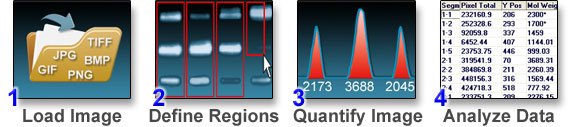
Although the UN-SCAN-IT gel Software has numerous options and features, the basic operation simply consists of converting an image (JPG, TIFF, GIF, BMP, PNG, etc.) into pixel density and area values through a few simple gel analysis steps...
UN‑SCAN‑IT gel Features
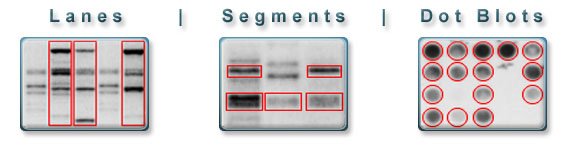
- Lane analysis mode for gel lanes
- Segment analysis mode for gel segments
- Dot Blot Analysis
- Clone Drawing Mode
- Grayscale and Color Gel Analysis
- Full Image Resolution gel analysis
- Analyze JPG, TIFF, GIF, BMP, PNG and other image formats
- Linear and logarithmic optical densities
- Point and click peak insertion and editing
- Automatic and user defined lane sizing and alignment
- Concentration and MW Calibration Curves
- Saturation Checking
- Lane/Segment Slider
- Segment Labeling
- Sequencing gel mode (ACGT)
- Image intensity calibration for true reproducibility
- Resizable windows and custom screen colors
- Intuitive and easy to use electrophoresis software
- Data stored in ASCII and clipboard format for use in spreadsheet, data analysis or graphics programs
- Online help
- Code Signed for security
- Free customer support
- + All the graph digitizing features of regular UN‑SCAN‑IT
Newest Features
- Zoomable Analysis Screen
- Scalable Image Control
- Distance Measuring Tool
- Toolbar Shortcuts
- Gaussian Peak Resolving
- Context Sensitive Help Buttons and Tooltips
- Faster Digitizing (Turbo Mode)
- Additional Image Format and Larger Image Support
- New Peak Finding Options
- Band Normalization Tool
- New Graph Digitizing Features
- and More...
Tutorial Video
Click Here for Gel Analyzer Tutorial Video...